Chat AI Becomes More Autonomous in Refact.ai: Introducing Tool Use
Refact.ai has just launched Tool Use in chat—a chat feature that makes AI smarter and more intuitive for your coding questions. You no longer need to type @commands to add context when asking about your codebase. Just tell the AI what you need, and it will autonomously decide and run commands to give you accurate answers.
With Tool Use, the chat AI now has advanced decision-making: your conversations feel more natural, with more context-relevant AI responses and fewer model hallucinations. AI-assisted coding using Refact.ai is now simpler and more efficient than ever!
How Does Tool Use Work?
Tool Use leverages a suite of built-in tools that the AI can call upon as needed. These include workspace and file searches, definition lookups, and reference checks. Just ask your question, and the AI will determine and gather the necessary context.
Now, when you ask, “What is MyClass doing?”, the model will autonomously find the definition of MyClass:
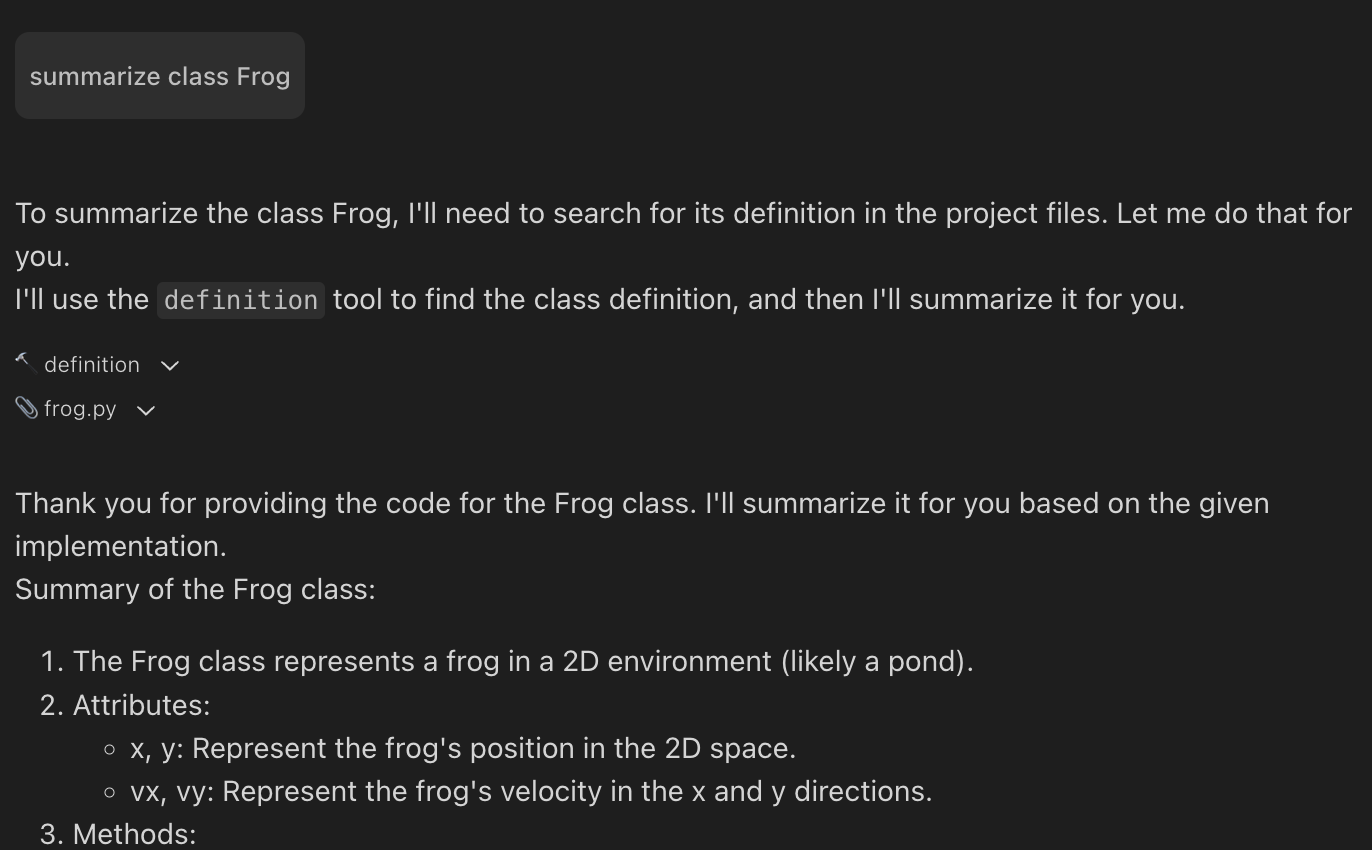 Tool Use in Refact.ai
In this example, the model (Claude 3.5 Sonnet) decided to use the definition tool to retrieve the code it needs to do its job:
- You can expand the tool usage section in the UI to see what’s happening behind the scenes.
- You can also view the files that were included in the context.
You can still manually attach context using @commands (@workspace, @file, @definition, @references, @symbols-at) or search_at.
However, with Tool Use, this process becomes easier and doesn’t require any additional input from you beyond your initial question:
- The AI model analyzes each of your messages to determine the context needed.
- It autonomously fetches the required information from your codebase.
- It processes the gathered data.
- And provides you with a precise, context-aware answer.
With RAG behind the scenes, this happens automatically and seamlessly for the user, significantly boosting your productivity.
FYI: What tools are available to the model?
search_workspace(“query”) - runs a search over all files in the workspace, using VecDB. The nice thing about it, it will match semantically close pieces of code or comments, it doesn’t need to be an exact match. You can run a similar search yourself using @workspace command, and immediately see the context it produces even before you submit your question.
search_file(“query”, “path/file.ext”) - the same search, but the scope is limited to a single file. Large files exist in the real world that don’t fit into context at all!
file(“path/file.ext”) - just posts the whole file into the context. You can manually do the same using the @file command.
definition(“symbol”) - look up the definition of symbol. You can use @definition to do the same manually.
references(“symbol”) - look up usages of a symbol. You can use @references to do the same manually
How to Activate Tool Use in Refact.ai?
There are a few knobs to utilize Tool Use in your Refact.ai plugin:
- Enable Tool Use:
When starting a new chat, you’ll see an option labeled ‘Allow model to use tools’. This is enabled by default, giving the AI access to various tools. However, you can turn this off if you’re chatting not about your current project - Configure Settings:
In the settings menu, you’ll find two important checkboxes:- AST (Abstract Syntax Tree)
- VecDB (Vector Database)
These are typically enabled in the latest version. When checked, they create search indexes for your workspace, empowering the AI with more context-awareness and giving it access to @-commands. - Update Your Plugin:
Currently, Tool Use works only in VSCode. Make sure you’ve updated your plugin to the latest version to access Use Tools.
Tool Use is available in all Refact.ai plans. However, with Pro, Teams, and Enterprise plans, you get more context tokens, so the model can better understand your code and give you more precise responses.
Try Refact.ai Pro today: Use the promo code WELCOME to get 1 month free.
Which Models Work Better with Tool Use? Our Comparison.
Refact.ai offers a selection of AI models for individual use:
- GPT-4o mini
- GPT-4o
- GPT-4 Turbo
- GPT-3.5 Turbo
- Claude 3.5 Sonnet
Let’s look how Tool Use works with popular GPT-4o-mini, GPT-4o and Claude 3.5 Sonnet models. Let’s take a look at a simple example:
class Toad(frog.Frog):
   def __init__(self, x, y, vx, vy):
       super().__init__(x, y, vx, vy)
       self.name = "Bob"
We’ll ask different models to write another class similar to Toad, without manually providing any context.
Models’ Comparison
GPT-4o-mini, GPT-4o
➕ Writes its intentions, or even a plan of actions to complete the goal
➕ Mostly calls the right tools
➕ Keeps the text relatively compact
➖ Doesn’t look at system prompt all that much
➖ Sometimes struggles with user instructions, given several files or a big context in general
 Tool Use with GPT-4o in Refact.ai
Claude 3.5 Sonnet
➕ Always writes a good plan
➕ The best model currently available for programming
➖ Tends to call search() all the time, instead of for example definition(), that might point to lower diversity in the training data
➖ After receiving a big context, writes another good plan :)
➖ Generates explanations that are too long to practically read, although you can tell it to keep it brief.
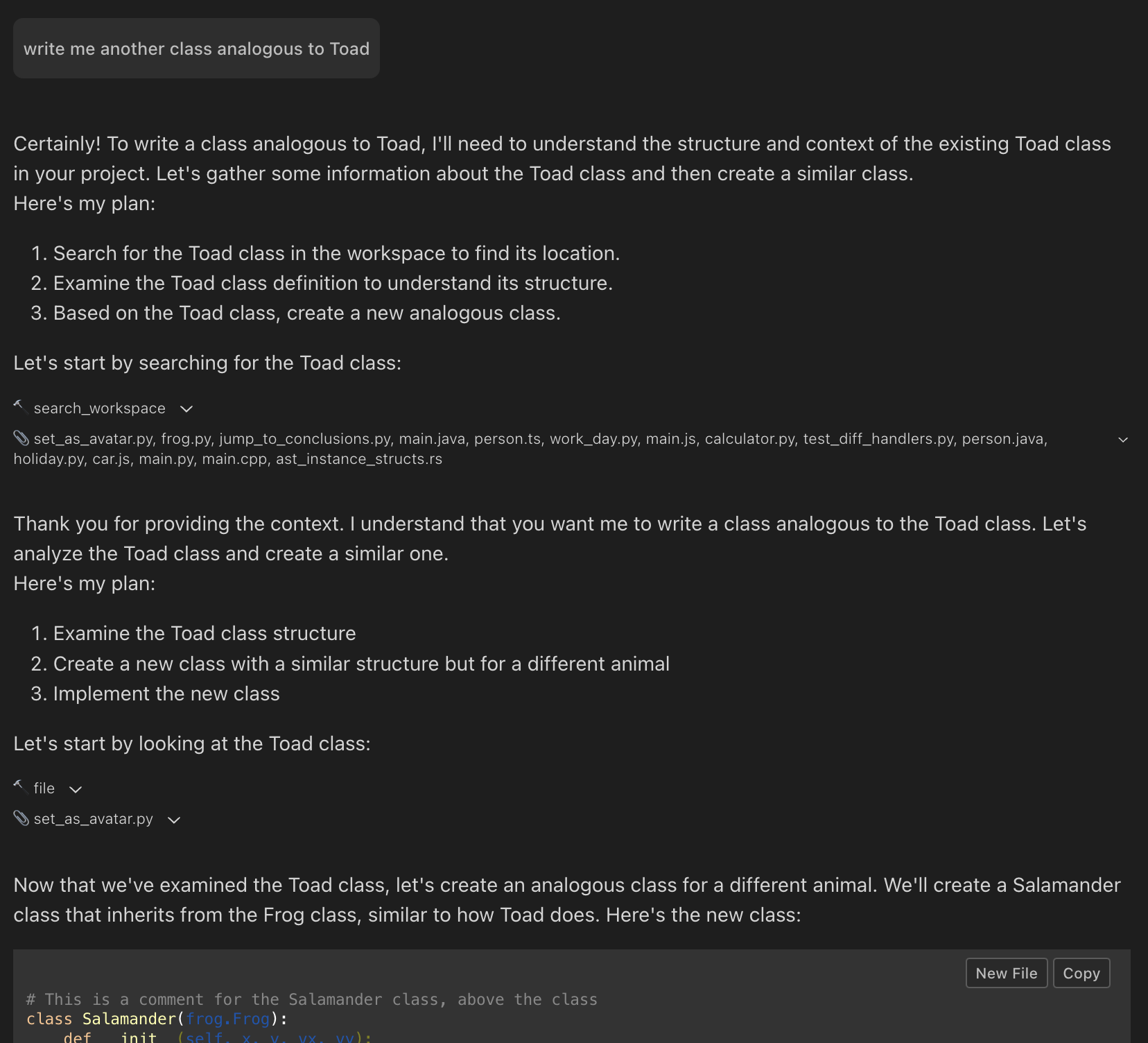 Tool Use with Claude 3.5 Sonnet in Refact.ai
Summary
With tool use you just ask your question, and the model will look for the necessary information. But you still can use @-commands to manually fill the context for more fine control over what the model gets to see.
Summing Up: Key Benefits of Tool Use for Developers
Whether you’re exploring a new codebase or diving deep into your own project, Tool Use is designed to make your development experience smoother, faster, and more productive.
- No need to know or use @commands
- Reduced chance of AI hallucinations or incorrect information in chat
- Ability to handle complex, multi-step queries
- Faster, more accurate responses to your coding questions
Our Next Step: Autonomous AI Agent
Autonomous AI Agent is the holy grail of programming, that can work on code autonomously: run tests, fix bugs, follow plans, and search for best solutions.
Exciting news: We’re launching a pre-release version of this next-generation product soon!
Want to get early access to our autonomous AI agent and participate in the testing? Join our dedicated Discord channel for alpha users! Experience it firsthand and contribute to the development.
Refact.ai is hiring! If you’re interested in joining our team, message us on Discord with a link to your GitHub profile. Or you can make a contribution — Refact.ai is open source.
Build the future of programming with Refact.ai!